🎮 Shadow Point - Accessibility & VR Comfort Testing Case Study (Quest 3)
🧾 About this work
- Author: Kelina Cowell - Junior QA Tester (Games)
- Context: Self-directed manual QA portfolio project
- Timebox: 1 week
- Platform: Meta Quest 3 (standalone)
- Build: 1.4
- Scope: Tutorial and early chapters, first-time player viewpoint (seated VR)
- Focus: VR comfort and accessibility testing (tutorial clarity, subtitles/readability, non-audio confirmations, seated reach, UI legibility)
Introduction
One-week, solo, self directed QA portfolio project on Shadow Point (Meta Quest 3, standalone), tested from 8 to 13 December 2025. The project focused on accessibility, comfort, and seated VR play, with particular attention to early-game onboarding, locomotion, camera behaviour, text readability, audio cues, and cognitive load during puzzle interaction.
Testing was exploratory and charter driven, using structured comfort, accessibility, and cognitive heuristics rather than full functional or content coverage. The scope did not aim to replicate studio QA or full regression, but to evaluate access and comfort risks that could affect usability, retention, and first-time VR experience.
Charters and checks were informed by established XR accessibility guidance and applied insight from industry practitioners, including Ian Hamilton’s VR comfort principles, BBC XR cognitive barriers, W3C XR Accessibility User Requirements, Game Accessibility Guidelines, and practitioner feedback from Dr Tracy Gardner on cybersickness and movement risk. These frameworks were used to shape charter design, session focus, and how findings were framed and prioritised.
- Scope: Solo, self directed one-week portfolio pass on Shadow Point using Meta Quest standalone (build 1.4). Coverage focused on VR accessibility, comfort, and seated usability in the early rooms, including subtitles, non-audio cue redundancy, input flexibility, comprehension and expectation checks, and comfort stability during locomotion and the cable car sequence. No claim of studio coverage or full regression.
- Approach: Risk-based charter testing executed through a Charter Matrix and time-boxed Session Log. Charters were marked complete or consolidated where coverage overlapped, with follow-up checks only when new risks surfaced (for example, subtitle behaviour triggering deeper subtitle-specific coverage). Applied Insight notes were used to shape charters and expectations for accessibility and comfort checks.
- Outcome: 20 logged sessions (S-001 to S-020) produced 11 tracked issues. Key themes included subtitle readability and occlusion (SP-12, SP-17, SP-24, SP-25), clarity and confirmation gaps when audio cues were removed (SP-27, SP-28), and Room 3 seated interaction and UI clarity issues (SP-18 to SP-21). One additional low priority visual issue was logged for hand alignment during move plus look (SP-4).
- Evidence: Workbook tabs exported as PDF (Session Log, Charter Matrix, Bug Log) supported by video and screenshot evidence per session and per issue. Sessions include timestamp anchors for key observations, and Bug Log entries record the matching media type (video, screenshot, or both).
| Studio | Platform | Scope |
|---|---|---|
| Coatsink | Meta Quest standalone (Quest 3), build 1.4 | Charter-driven VR accessibility and comfort pass focused on seated play, subtitles, non-audio cue redundancy, locomotion comfort, and early-room cognitive barriers. |
🎯 Goal
Show how I run a realistic one-week VR accessibility and comfort pass on Shadow Point (Meta Quest 3, standalone), using charter-driven sessions to evaluate seated play, comfort stability, subtitle accessibility, non-audio cue redundancy, and early-game cognitive barriers.
🧭 Focus Areas
- Camera behaviour and horizon stability, including the cable car sequence
- Locomotion and turning comfort options (seated controller play)
- Subtitles: availability, legibility, and occlusion
- Non-audio confirmation at volume 0 (visual and haptic cues)
- Seated reach and input strain checks (including trigger and grip interactions)
- Cognitive barriers in early rooms: comprehension, expectation, and wayfinding
📄 Deliverables
- Session Log with time-boxed runs, results summaries, and evidence type per session (S-001 to S-020)
- Charter Matrix showing planned coverage, what was completed, and where checks were consolidated
- Bug Log with severity, reproducibility, and media type (video and screenshots) per issue
- Applied Insight document showing the accessibility frameworks used to shape charters and checks
📊 Metrics
| Metric | Value |
|---|---|
| Total Bugs Logged | 11 |
| Critical | 0 |
| High | 0 |
| Medium | 7 |
| Low | 4 |
| Repro Rate | 6× 3/3, 1× 2/2, 4× 1/1 |
⭐ STAR SUMMARY – Shadow Point VR Accessibility and Comfort QA (Meta Quest 3)
Situation: One-week, solo, self directed QA portfolio project on Shadow Point on Meta Quest 3 standalone (build 1.4). Testing focused on early game play in seated VR, where comfort, readability, and clarity issues can quickly become access barriers.
Task: Run a realistic charter-driven accessibility and comfort pass for seated VR play. Prioritise high-risk areas including locomotion and turning comfort, horizon stability, camera predictability, subtitle legibility, non-audio cue redundancy (especially at volume 0), input flexibility and fatigue, and cognitive barriers during puzzle interaction (comprehension, expectation, and wayfinding).
Action: Created a charter set informed by applied XR accessibility guidance (comfort fundamentals, cognitive barriers, and XR accessibility requirements), then executed 20 time-boxed sessions (S-001 to S-020) with timestamp anchors and evidence capture. Coverage and decisions were tracked through a Charter Matrix, with outcomes summarised in a 1-Liner Summary for fast review. Issues were logged in a structured Bug Log with severity, reproducibility, and linked evidence, and high-impact themes were followed up in targeted rechecks (for example, subtitle behaviour driving deeper subtitle-specific coverage).
Result: Logged 11 issues in total (7 medium, 4 low), with reproducibility recorded per issue (1/1, 2/2, or 3/3). The main risk areas identified were subtitle accessibility (readability and occlusion), early-game clarity and confirmation gaps when audio cues were removed, and seated interaction and UI clarity issues in Room 3. Comfort checks for movement, turning, and stability were also exercised across multiple sessions, with findings recorded against the relevant charters.
🤝 Networking & Applied Insight
For this project, I did not rely on personal preference or gut feel. I built the charters and checks on top of established XR accessibility guidance, plus targeted input from people actively working in VR and XR accessibility.
Ian Hamilton (VR accessibility guidance) formed the comfort foundation of the project. I used his comfort fundamentals to shape the “spine” charters for camera behaviour, locomotion, vignettes, horizon stability, seated play, and VR text readability.
Jamie Knight (BBC XR Barriers, cognitive accessibility) influenced the cognitive layer of the pass. Based on his direction via a phonecall, I used the BBC XR Barriers framework as a set of heuristics and built COG01 to COG05 around comprehension, expectation, wayfinding, timing, and focus and memory. This was treated as a heuristic accessibility review, not a user study.
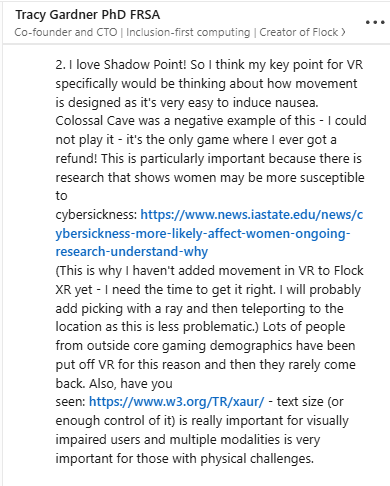
Dr Tracy Gardner PhD FRSA (Co-founder and CTO - Flip Computing & Flock XR) reinforced that movement design is one of the highest risk areas for VR accessibility because poor locomotion can trigger nausea and put players off VR entirely. Her feedback helped frame locomotion and rotation checks as access barriers and retention risks, not just “comfort preferences”, and it pushed me to strengthen checks around text controls and multi-modal communication.
I also used W3C XR Accessibility User Requirements (XAUR) as the standards layer to keep checks aligned with formal XR accessibility expectations. This supported charters around seated posture, alternative input paths, reduced motor strain, multi-sensory communication, and UI clarity.
Finally, I used Game Accessibility Guidelines as the practical pattern layer. This strengthened expectations around text size and contrast, subtitle and audio cue patterns, and cognitive load reduction (chunking, re-readable instructions, and reducing multi-task overload).
Together, these layers shaped how I wrote the charters, what I prioritised in sessions, and how I described player impact in the final write-up.
| Source | Key takeaway | How I applied it in this project | Evidence |
|---|---|---|---|
|
Ian Hamilton VR accessibility and comfort guidance |
VR comfort fundamentals should be treated as an accessibility baseline, not a preference. Focus on stable camera behaviour, predictable movement, horizon stability, seated play considerations, and readable text at real VR distance. |
|
VR Accessibility – Ian Hamilton |
|
Jamie Knight BBC XR Barriers (cognitive accessibility) |
Puzzle based VR needs targeted cognitive accessibility checks. The BBC XR Barriers give practical categories for where players get blocked, especially neurodivergent players. |
|
BBC XR Barriers – Cognitive accessibility |
|
Dr Tracy Gardner Flip Computing, Flock XR |
Locomotion is a high risk accessibility surface in VR. Poor movement design can trigger nausea quickly and can be a retention barrier, not just a comfort issue. Multi-modal communication matters, especially when audio is reduced or removed. |
|
 Click to enlarge
|
|
W3C XAUR XR Accessibility User Requirements |
Use standards-level requirements to validate accessibility expectations in XR, including neutral posture, alternative input paths, reduced motor strain, and multi-sensory communication. |
|
W3C XR Accessibility User Requirements (XAUR) |
|
Game Accessibility Guidelines Practical accessibility patterns |
Use concrete design patterns for text, subtitles, audio cues, and cognitive load reduction (chunking, re-readable instructions, reduced multitasking). |
|
Game Accessibility Guidelines – Full list |
📚 Accessibility Training & Application
In preparation for this project I completed Microsoft’s Gaming Accessibility Fundamentals to get a structured view of how disabled players interact with games, how the five disability categories (motor, cognitive, vision, hearing, speech) map to common barriers, and how studios typically frame accessibility work in terms of risk and audience reach. This gave my first VR accessibility case study the same concepts and language many studios use, rather than my own ad hoc terms. I brought that baseline into the Shadow Point project, then layered on VR specific comfort and XR barrier research.
Course completed for this project:
- Gaming Accessibility Fundamentals (Microsoft) – Introductory course covering how disabled players interact with games across the five main disability categories (motor, cognitive, vision, hearing, speech). It includes practical patterns for more inclusive design, examples of good and bad implementations, and an accessibility “tags” approach to identify who is affected by a barrier. It also frames accessibility as risk reduction and audience reach, not just “extra options”.
Practice in this project:
- Used Microsoft’s disability categories as the backbone for my Charter Matrix, tagging each charter with the dominant area (for example, comfort, motor, hearing, vision, cognitive) instead of treating accessibility as one vague category.
- Mapped the early chapters against first-pass accessibility surfaces highlighted by the course: input flexibility, motor fatigue, audio and subtitles, text and UI readability, and cognitive load. This directly shaped charters such as SEAT01, INPUT01, HEAR01 and TEXT01, and supported the later cognitive charters built using the BBC XR Barriers framework.
- Applied a “barrier → impact → mitigation” mindset when writing findings, noting which player groups are affected and what small changes could unlock the experience for them.
- Treated my own profile (dyslexic and dyscalculic player in VR) as one relevant persona to help spot cognitive and timing risks, then cross-checked those observations against Microsoft’s guidance rather than assuming my experience is universal.
📷 Evidence & Media
These links are the complete artefacts for this project. They contain:
- Overview and scope
- Charters and session notes (Charter Matrix and Session Log)
- Bug Log
- Applied Insight and frameworks used to shape the charters
- Glossary and methodology notes
| Type | File / Link |
|---|---|
| QA Workbook (Google Sheets) | Open Workbook |
| QA Workbook (PDF Export) | Open PDF |
📌 Core Project Findings - Sessions and Bugs
This project was a charter-driven accessibility and comfort pass for seated VR play on Shadow Point (Meta Quest 3, standalone, build 1.4). Across 20 logged sessions (S-001 to S-020), I focused on comfort stability (camera behaviour, locomotion, horizon reference points), subtitle accessibility, non-audio cue redundancy, seated reach and input strain, and cognitive barriers during early puzzle interaction.
Across the project I logged 11 issues in the Bug Log. The main themes were subtitle accessibility problems, including readability and occlusion (SP-12, SP-17, SP-24, SP-25), clarity and confirmation gaps when audio cues were removed or volume was set to 0 (SP-27, SP-28), and Room 3 seated interaction and UI clarity issues (SP-18 to SP-21). One additional low priority visual issue was logged for hand alignment during move plus look (SP-4).
📁 Jira Board Screenshot - Overview
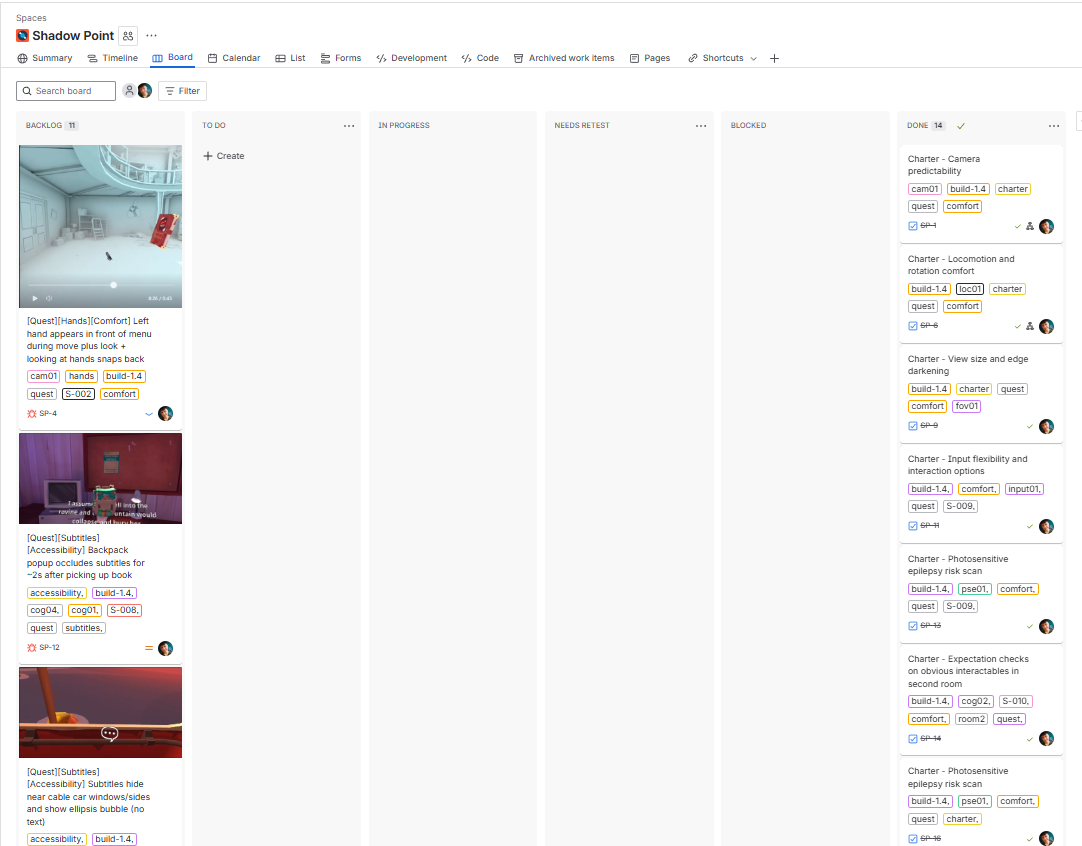
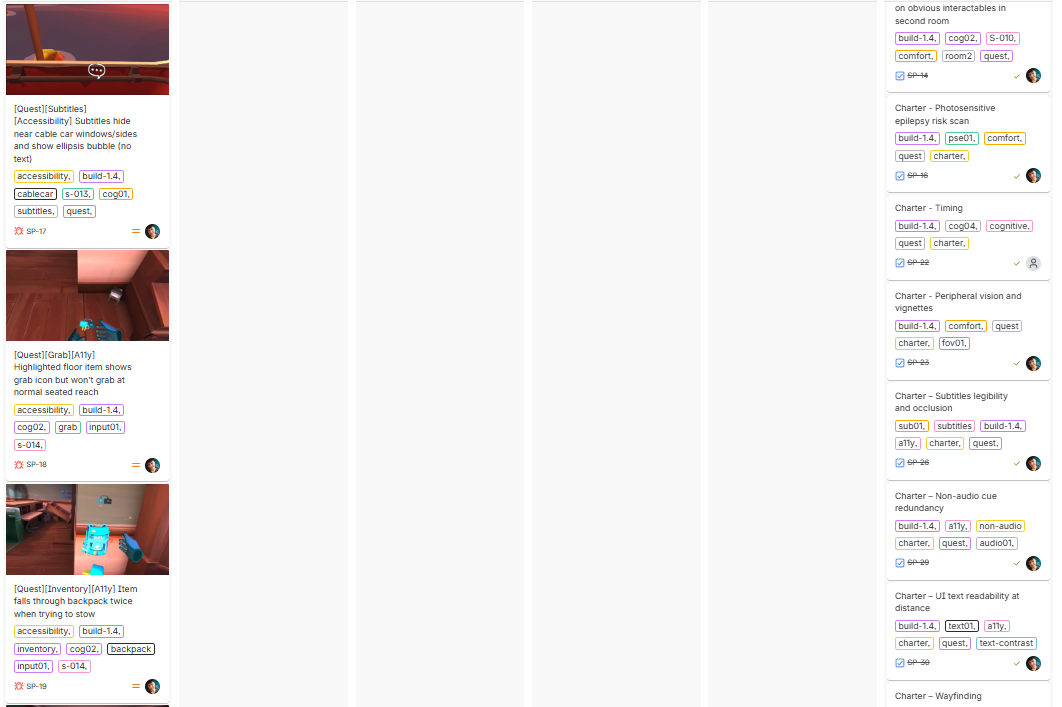
🗂️ Jira Board - Overview Continued
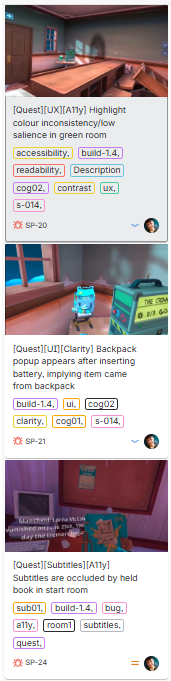
|
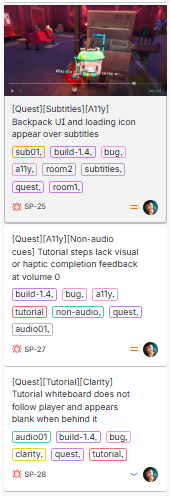
|
Click any thumbnail to view the full-size image.
🗂️ Jira - Bug Ticket Layout Example
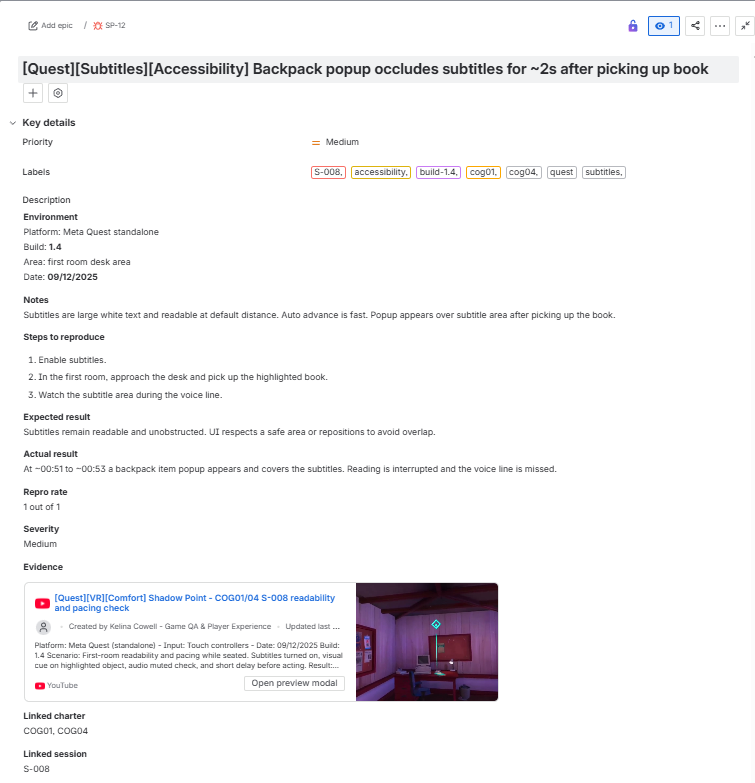
|
Click thumbnail to view the full-size image.
🐞 Bugs – Summary + Screenshots/Videos
| ID | Title | Sev | Repro | Screenshot |
|---|---|---|---|---|
| SP-4 | [Quest][Hands][Comfort] Left hand appears in front of menu during move plus look + looking at hands snaps back | Low | 1/1 |
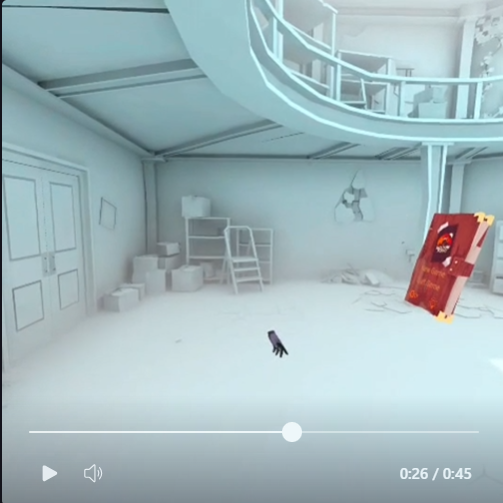
|
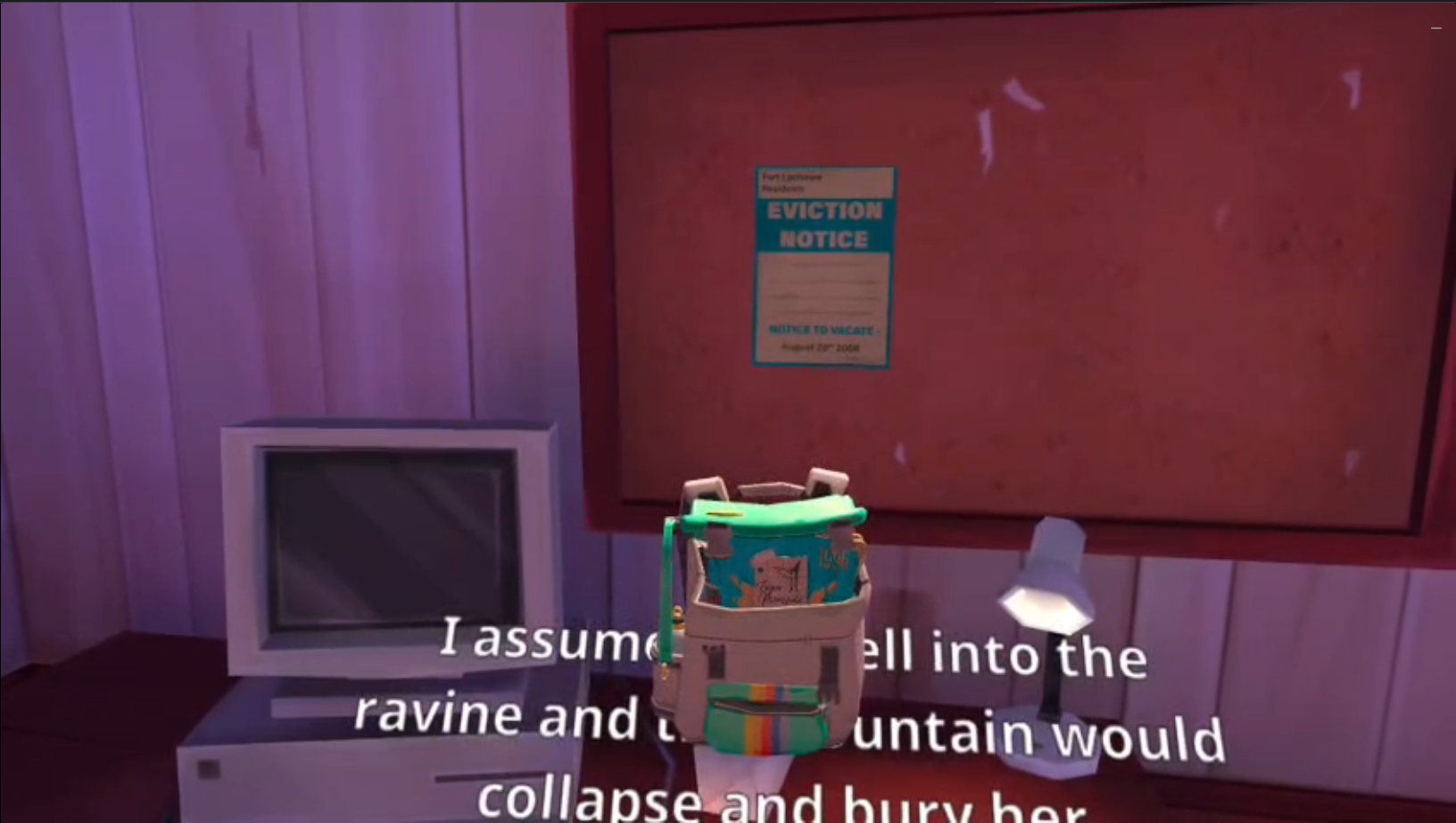
| SP-12 | [Quest][Subtitles][Accessibility] Backpack popup occludes subtitles for ~2s after picking up book | Medium | 3/3 |
|
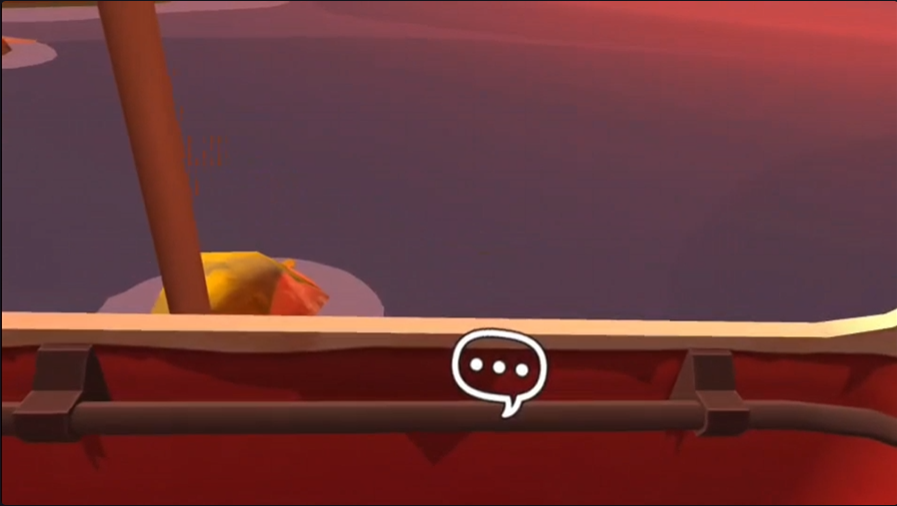
| SP-17 | [Quest][Subtitles][Accessibility] Subtitles hide near cable car windows/sides and show ellipsis bubble (no text) | Medium | 3/3 |
|
| SP-18 | [Quest][Grab][A11y] Highlighted floor item shows grab icon but won't grab at normal seated reach | Medium | 1/1 |
![[Quest][Grab][A11y] Highlighted floor item shows grab icon but won't grab at normal seated reach](https://img.youtube.com/vi/KBMxSooHhwk/hqdefault.jpg)
|
| SP-19 | [Quest][Grab][A11y] Highlighted floor item shows grab icon but won't grab at normal seated reach | Medium | 2/2 |
|
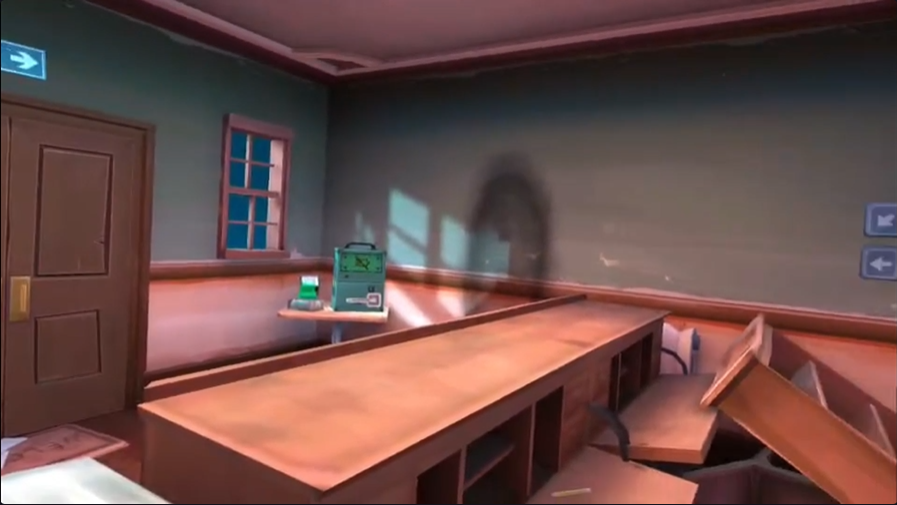
| SP-20 | [Quest][UX][A11y] Highlight colour inconsistency/low salience in green room | Low | 1/1 |
|
| SP-21 | [Quest][UI][Clarity] Backpack popup appears after inserting battery, implying item came from backpack | Low | 1/1 |
|
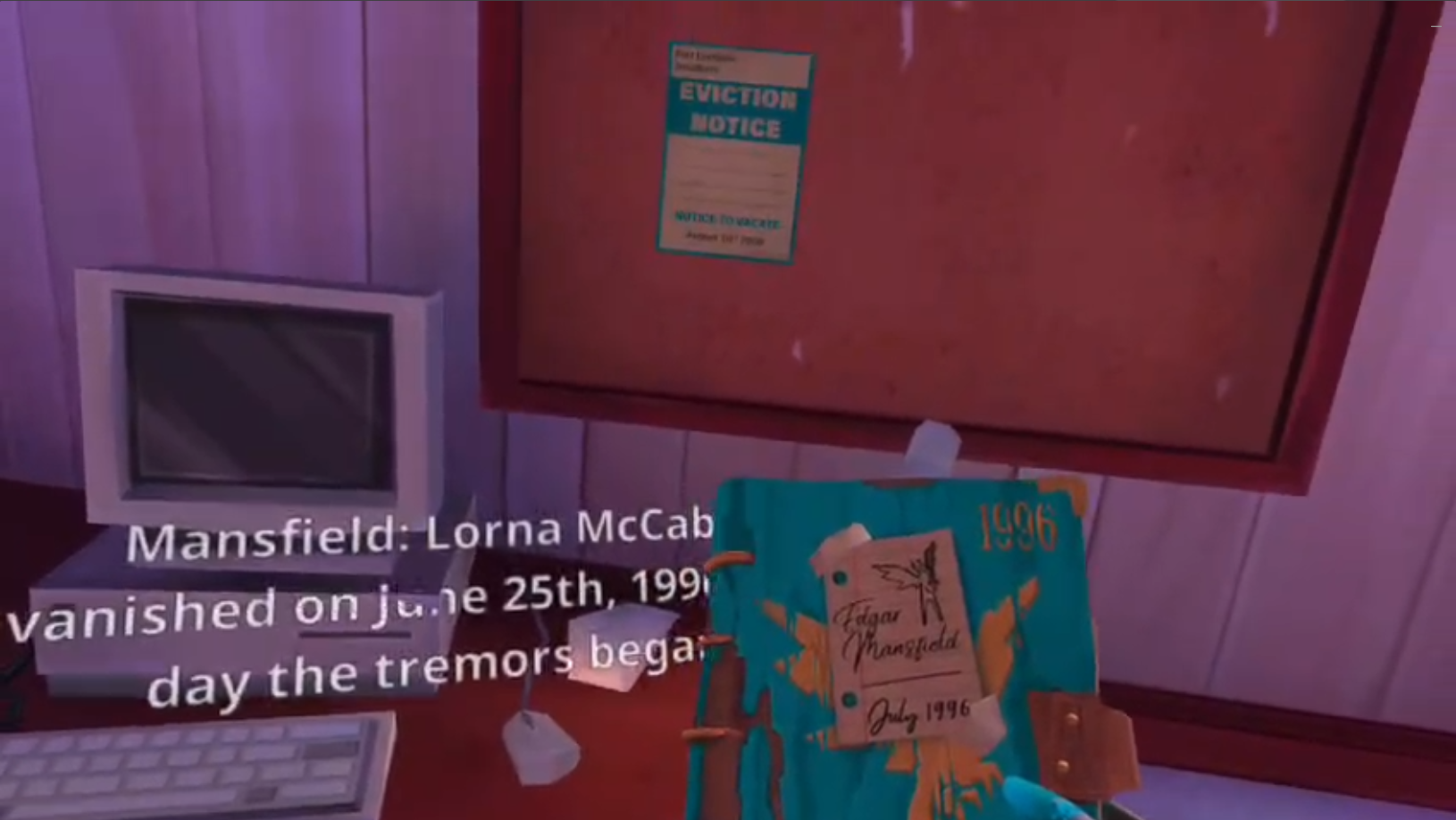
| SP-24 | [Quest][Subtitles][A11y] Subtitles are occluded by held book in start room | Medium | 3/3 |
|
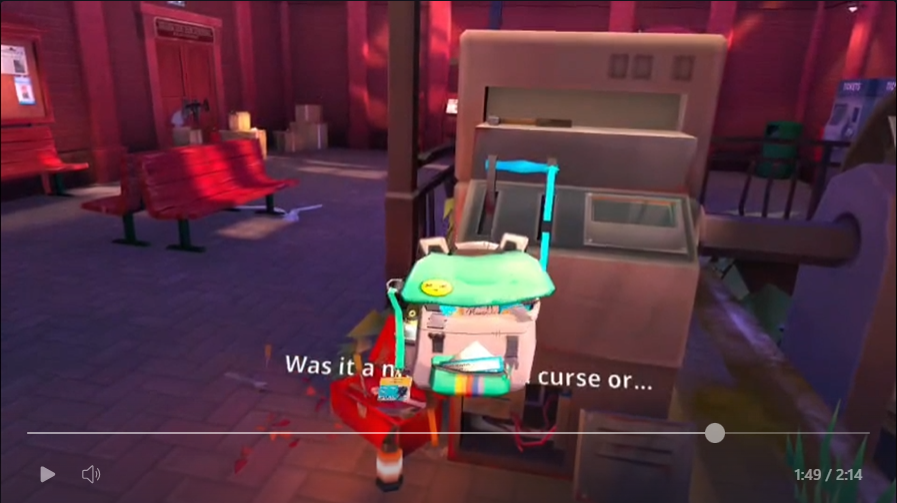
| SP-25 | [Quest][Subtitles][A11y] Backpack UI and loading icon appear over subtitles | Medium | 3/3 |
|
| SP-27 | [Quest][A11y][Non-audio cues] Tutorial steps lack visual or haptic completion feedback at volume 0 | Medium | 3/3 |
![[Quest][A11y][Non-audio cues] Tutorial steps lack visual or haptic completion feedback at volume 0](https://img.youtube.com/vi/BLN0tsJyDQw/hqdefault.jpg)
|
| SP-28 | [Quest][Tutorial][Clarity] Tutorial whiteboard does not follow player and appears blank when behind it | Low | 3/3 |

|
📈 Results
- Completed a one-week, charter-driven accessibility and comfort pass for seated VR play on Meta Quest 3 standalone (build 1.4), across 20 logged sessions (S-001 to S-020).
- Logged 11 issues in total in the Bug Log: 7 medium and 4 low.
- Repro evidence was recorded per issue, with a mix of 3/3, 2/2, and 1/1 depending on how many rechecks were run.
- Primary theme: subtitles (accessibility and readability). Multiple issues centred on subtitle legibility and occlusion, including UI overlays and held objects obscuring subtitles, and subtitle behaviour during the cable car sequence (SP-12, SP-17, SP-24, SP-25).
- Audio removed: confirmation gaps. When volume was set to 0, tutorial steps relied on audio without sufficient visual or haptic confirmation, creating a non-audio cue redundancy risk (SP-27, SP-28).
- Seated interaction and UI clarity. Room 3 testing surfaced seated reach and clarity issues, including interactables that present as grabbable but fail at normal seated reach and UI signalling that can mislead the player (SP-18 to SP-21).
- Comfort and movement surfaces were exercised. Camera and locomotion comfort checks were run across sessions (including the cable car sequence), with outcomes captured against the relevant charters and any issues logged where found.
See Metrics above for the full table of runs and references.
🏁 Result and takeaway
Result: Across a one-week, charter-driven accessibility and comfort pass on Shadow Point (Meta Quest 3, standalone, build 1.4), I completed 20 logged sessions and recorded 11 issues in the Bug Log (7 medium, 4 low), each with captured evidence and a recorded repro rate.
Takeaway: The highest-impact risks were concentrated in subtitle accessibility and clarity when audio cues were removed. Subtitle occlusion and behaviour issues can block comprehension for players who rely on subtitles, and non-audio confirmation gaps at volume 0 create avoidable barriers for Deaf and hard of hearing players or anyone playing with reduced audio. Seated interaction and UI clarity issues in Room 3 also show how small reach and signalling problems can turn into friction and frustration in puzzle progression.
🧠 What I learned
- Charters stop VR testing from becoming chaos. A clear Charter Matrix kept the week focused and made it obvious what had been covered, what was consolidated, and what still needed a follow up.
- Comfort is an accessibility baseline, not a preference. Treating locomotion, turning, horizon stability and predictable camera behaviour as access surfaces helped me prioritise checks that directly affect whether someone can keep playing.
- Subtitles are a core UX surface in VR. Occlusion and readability issues were not minor. When subtitles are blocked by UI or held objects, comprehension can fail instantly for players who rely on them.
- Audio-off testing exposes missing redundancy fast. Setting volume to 0 is a simple way to reveal where the game depends on audio without providing equivalent visual or haptic confirmation.
- Seated reach needs to match what the UI promises. If an interactable highlights and shows a grab icon but cannot be grabbed at normal seated reach, the game is effectively misleading the player and creating unnecessary friction.
- Cognitive checks belong in puzzle VR. Using the BBC XR Barriers as heuristics helped me frame confusion, missing expectation setting, and unclear wayfinding as accessibility issues rather than player error.
- Good admin makes the work easy to audit. Session IDs, clear repro notes, and consistent evidence logging kept the project easy to review and reduced time wasted trying to reconstruct what happened.
🔚 Conclusion
One-week, charter-driven accessibility and comfort pass completed on Shadow Point (Meta Quest 3, standalone, build 1.4), tested from 8 to 13 December 2025. The project was tightly scoped to seated VR play and high-risk accessibility surfaces, using structured charters rather than broad, unbounded exploration.
- Coverage delivered: comfort stability checks for camera behaviour and horizon reference points, locomotion and turning options, and the cable car sequence, plus seated reach and input strain checks, subtitle availability and readability, non-audio cue redundancy at volume 0, and early-room cognitive barrier checks (comprehension, expectation, and wayfinding).
- Highest-impact findings: subtitle accessibility issues, including occlusion and behaviour problems (SP-12, SP-17, SP-24, SP-25), and confirmation gaps when audio was removed or reduced (SP-27, SP-28). These risks can block comprehension and increase friction, especially for players who rely on subtitles or non-audio cues.
- Evidence maturity: Coverage and outcomes are traceable through the Charter Matrix and Session Log, with 11 logged issues recorded in the Bug Log. Each issue includes severity, repro rate, and the matching evidence type (video, screenshot, or both), providing a clear audit trail from session observations to final conclusions.
Up next: Educational UX and cognitive load testing on a browser-based 3D game design tool for young learners. This planned case study focuses on first-time onboarding and the “what do I do now?” moment, learning flow and pacing of concepts, feedback and error recovery, and lightweight accessibility checks for text, contrast, icons, and hit targets. Planned deliverables include a first-time learner journey map, a short set of UX and accessibility findings with practical recommendations, and an issue list grouped by onboarding, learning flow, and editor usability. The product name will remain anonymous by agreement, and findings will be shared privately unless I have approval to publish a named case study.
Email Me Connect on LinkedIn Back to Manual Portfolio hub
📎 Disclaimer
This is a personal, non-commercial portfolio for educational and recruitment purposes. I’m not affiliated with or endorsed by any game studios or publishers. All trademarks, logos, and game assets are the property of their respective owners. Any screenshots or short clips are included solely to document testing outcomes. If anything here needs to be removed or credited differently, please contact me and I’ll update it promptly.