Back to Articles Hub Game QA Portfolio
VR Comfort Testing in Game QA: Locomotion, Subtitles, and Accessibility
An applied QA article, not a definition page and not a full project dump.
This article shows how I approach VR testing in game QA, focusing on VR comfort testing, accessibility testing, and usability checks, backed by a real one-week solo pass on Shadow Point (Meta Quest 3, standalone). It demonstrates how I scope comfort and accessibility risk for seated play, what I prioritise first, and how I turn locomotion, subtitle, clarity, and non-audio cue observations into structured findings using recognised XR accessibility guidance, formal standards, and expert-informed heuristics, rather than gut feel or personal preference.
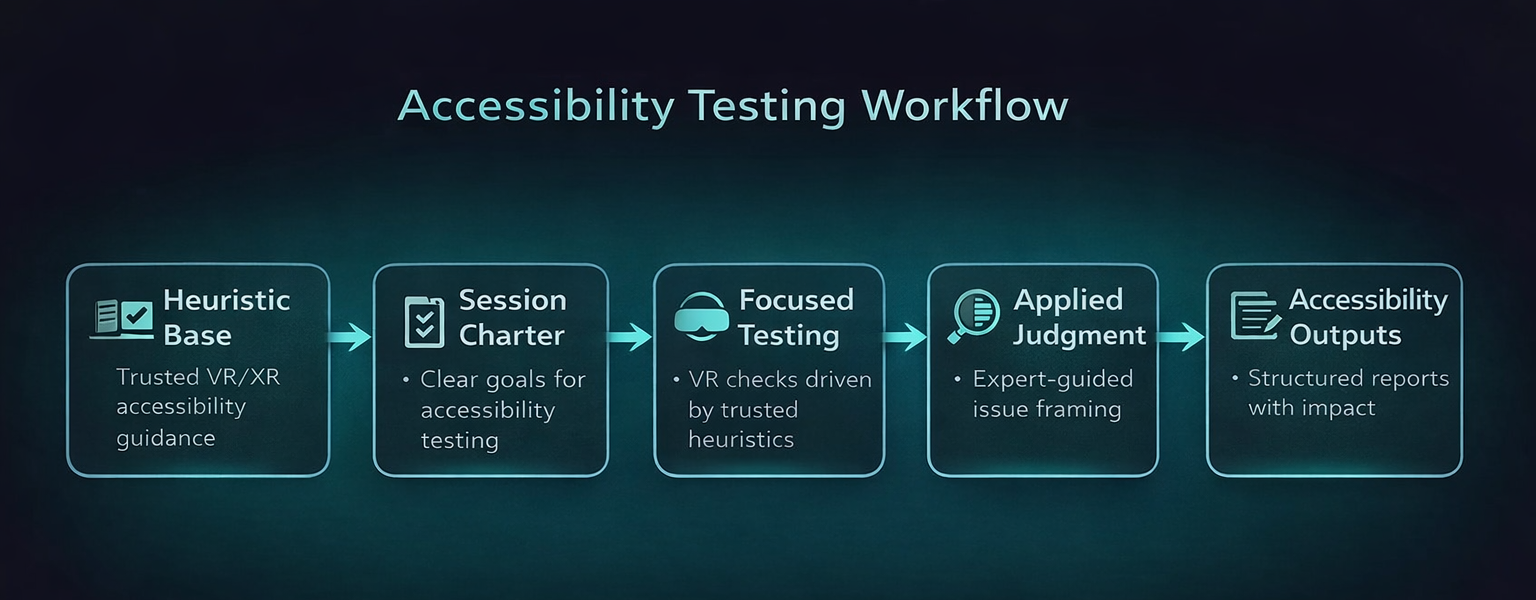
VR Testing TL;DR
- Workflow shown: VR comfort testing in game QA using comfort-risk scoping → charter-driven testing sessions → targeted follow-up checks → evidence-backed findings.
- Example context: Shadow Point on Meta Quest 3 (standalone), used as a real-world VR game QA case study.
- Build context: tested on build
1.4from 08 Dec to 13 Dec 2025. - Primary focus: seated VR accessibility testing, subtitles, non-audio confirmation, VR locomotion comfort, camera predictability, and early-room cognitive barriers.
- Guidance foundation: Ian Hamilton, BBC XR Barriers, Dr Tracy Gardner, W3C XAUR, and Game Accessibility Guidelines informed the QA testing approach.
- Outputs: Charter Matrix, Session Log, Bug Log, and linked screenshot/video evidence across 20 logged sessions for structured QA reporting.
VR comfort testing scope in game QA: what I covered and why
This article is grounded in a self-directed testing pass on Shadow Point using Meta Quest 3 standalone, run in a one-week solo timebox. Scope was risk-based and charter-driven, focused on the tutorial and early chapters from a first-time seated-player viewpoint. Coverage centred on VR comfort testing and accessibility testing, including comfort stability, subtitle accessibility, non-audio cue redundancy, seated reach and input strain, UI legibility, and early-room comprehension barriers. This was a heuristic-informed VR accessibility and comfort review in QA, not a user study and not full regression testing.
What VR comfort testing is in game QA
VR comfort testing in game QA is not just asking “did this make me feel sick?” That is the useless version.
In practice, VR QA testing means checking whether movement, camera behaviour, text placement, tutorial messaging, interaction design, and sensory feedback create barriers that stop players from continuing comfortably, understanding what the game wants from them, or trusting the space enough to keep playing.
For this project, I did not build the pass on personal preference or vague “VR intuition”. I built it on recognised XR accessibility guidance and expert-informed heuristics. That included VR comfort fundamentals from Ian Hamilton, cognitive accessibility heuristics from the BBC XR Barriers framework, standards-level expectations from W3C XAUR, practical pattern guidance from Game Accessibility Guidelines, and practitioner insight from Dr Tracy Gardner on locomotion risk and multi-modal communication.
That matters because it changes the meaning of the findings. This article is not claiming “Kelina noticed smart things in VR.” It is showing how I translated established accessibility thinking into a structured, one-week manual QA testing pass for VR games.
What this project was, and what it was not
This was a heuristic-informed VR accessibility and comfort testing review in QA, not a user study. The goal was to test against recognised risk areas and accessibility expectations in a structured way, not to pretend I was running formal player research.
Why seated VR testing for first-time players comes first
For this project I tested from a first-time seated VR viewpoint because that is where VR accessibility and comfort issues show up fast in game testing. Early onboarding is where players decide whether they trust the game, and in VR that trust is fragile.
My checks focused on tutorial clarity, subtitle readability, seated interaction reach, non-audio confirmation, locomotion and turning comfort, and horizon stability during movement-heavy moments such as the cable car sequence.
Why first-time seated VR testing matters in QA
Seated first-time play is a strong stress point for VR accessibility testing because it combines unfamiliar controls, distance-based text, spatial interaction, and comfort sensitivity. If the game fails there, it risks losing players before the core experience even starts.
How I scope VR comfort and accessibility testing in game QA
I did not treat this as full functional coverage. It was a one-week solo portfolio pass, so the scope had to be selective and evidence-led. I focused on the areas most likely to create access barriers, comfort breakdown, or early-player drop-off in seated VR.
- Camera behaviour and horizon stability: does movement remain visually stable and predictable in VR gameplay?
- Locomotion and turning: do seated controller checks in VR testing reveal discomfort, disorientation, or motion sickness risk?
- Subtitles: are they available, readable, and usable as part of VR accessibility testing?
- Non-audio confirmation: if volume is reduced to 0, does the game still confirm actions clearly through visual or haptic means?
- Seated reach and input strain: does the interaction design support normal seated posture and realistic reach?
- Cognitive barriers: do early puzzle spaces create confusion around comprehension, expectation, timing, wayfinding, or memory load?
The foundation for those checks came from multiple layers of guidance used in VR accessibility testing. Ian Hamilton’s VR accessibility guidance acted as the comfort spine for charter design, shaping checks around camera behaviour, locomotion, vignettes, horizon stability, seated play, and VR text readability. Jamie Knight’s BBC XR Barriers framework shaped the cognitive layer of the pass, which I translated into COG01 to COG05 around comprehension, expectation, wayfinding, timing, and focus and memory.
Dr Tracy Gardner’s feedback strengthened how I framed locomotion and turning checks. Movement design in VR is not just a comfort preference surface. It is a high-risk accessibility area because poor locomotion can trigger nausea quickly and put players off VR entirely. That means movement problems are not just polish issues. They can be access barriers and retention risks during testing.
I also used W3C XR Accessibility User Requirements (XAUR) as the standards layer, which reinforced expectations around neutral posture, alternative input paths, reduced motor strain, multi-sensory communication, and UI clarity. Finally, I used Game Accessibility Guidelines as the practical pattern layer to strengthen expectations around subtitle stability, text readability, cue redundancy, chunked information, and reduced multitasking load.
Why this matters for VR QA testing
The pass was not shaped by “what felt good to me”. It was shaped by established XR accessibility thinking, standards-level expectations, and practical design patterns, then applied through a realistic manual QA testing workflow for VR games.
How my charter-driven VR testing workflow is structured in game QA
A clear charter set stops VR testing in game QA from turning into random headset wandering. For this project, the charters were not invented in a vacuum. They were built from recognised XR accessibility guidance and then translated into practical coverage for seated VR.
The comfort spine came from VR accessibility fundamentals, the cognitive layer came from BBC XR Barriers, and the standards/pattern layer came from XAUR and Game Accessibility Guidelines. That gave the pass a clear structure: not “test whatever seems annoying”, but test against known VR accessibility and comfort risk surfaces in a time-boxed, auditable way.
For Shadow Point, I used a Charter Matrix and time-boxed Session Log to keep the workflow structured. Sessions were logged as S-001 to S-020, with timestamp anchors, outcomes, and evidence type recorded against each run. Where checks overlapped, I consolidated them rather than pretending duplicate work was useful coverage.
What my testing workflow produced
- 20 logged sessions across seated VR comfort, accessibility, and cognitive checks
- 11 logged issues in total
- 7 medium and 4 low severity findings
- Repro evidence tracked as 3/3, 2/2, or 1/1 depending on follow-up depth
- Workbook tabs exported as PDF plus video and screenshot evidence tied to sessions and bug IDs for structured QA reporting
The guidance foundation behind this VR accessibility testing pass
One of the most important parts of this project was the foundation behind the testing. I did not want the write-up to imply that the findings came from personal taste, or that I was treating my own discomfort threshold as universal.
Instead, I built the pass on a layered guidance model used in VR accessibility testing:
- Comfort foundation: Ian Hamilton’s VR accessibility guidance shaped the core comfort charters for camera behaviour, locomotion, vignettes, horizon stability, seated play, and readable text at real VR distance.
- Cognitive framework: Jamie Knight’s BBC XR Barriers framework shaped the cognitive accessibility testing checks around comprehension, expectation, wayfinding, timing, and focus and memory.
- Movement risk framing: Dr Tracy Gardner’s practitioner input reinforced that locomotion is a high-risk accessibility surface and a retention risk, not just a comfort preference in VR game testing.
- Standards layer: W3C XAUR helped validate expectations around posture, alternative input paths, reduced strain, multi-sensory communication, and UI clarity in practice.
- Practical pattern layer: Game Accessibility Guidelines strengthened expectations around subtitles, cue redundancy, text readability, and cognitive load reduction.
That combination gave the project a more serious footing. It let me frame findings in terms of recognised VR accessibility testing risk rather than isolated personal observation.
Important boundary in VR QA testing
This does not turn the project into a formal user study, and I do not present it as one. It was a heuristic-informed VR accessibility testing pass in QA built on recognised guidance, executed through structured manual QA testing for VR games, with findings recorded against charters, sessions, and evidence.
VR subtitle accessibility testing in game QA
Subtitles in VR are not a minor polish layer. They are a core usability surface in VR accessibility testing.
In flat-screen testing, subtitle problems are often obvious. In VR, they get nastier because text competes with depth, camera angle, held objects, environmental framing, and UI overlays. That means a subtitle can technically exist but still fail the player in practice during VR game testing.
Subtitle testing in this pass was shaped by both standards and practical guidance. Ian Hamilton’s VR guidance helped frame readability as a VR distance and comfort problem, not just a flat UI problem, while Game Accessibility Guidelines strengthened expectations around subtitle stability, visibility, and clarity.
That matters because a subtitle can technically exist and still fail accessibility in practice. In VR, held objects, overlays, scene framing, and head position can all interfere with subtitle access. So the real question in VR testing is not “are subtitles turned on?” but “can players reliably use them under normal play conditions?”
In this pass, subtitle problems were one of the clearest issue clusters: SP-12, SP-17, SP-24, and SP-25 all related to readability or occlusion. These included backpack UI covering subtitles, held objects blocking them, and subtitle behaviour failing near cable car windows and sides.
Why subtitle failures matter in VR accessibility testing
Subtitle failure is not just a hearing-access issue. It also affects comprehension, pacing, confidence, and puzzle understanding. In a narrative puzzle game, that can break the whole onboarding experience and reduce player retention.
VR accessibility testing: why audio-off testing exposes missing redundancy fast
One of the quickest ways to expose weak accessibility design in VR testing is to set volume to 0 and see what falls apart.
If tutorial steps, interactions, or confirmations rely heavily on sound with no strong visual or haptic replacement, the game is telling on itself immediately during testing.
The non-audio cue checks were also grounded in guidance rather than improvisation within VR accessibility testing. XAUR reinforced the expectation for multi-sensory communication, and Game Accessibility Guidelines strengthened the practical expectation that important cues should not rely on audio alone.
That is why testing at volume 0 was useful. It was not a gimmick. It was a direct way to probe whether the tutorial and interaction flow still communicated clearly when one channel was removed.
That is exactly what happened here. SP-27 captured tutorial steps that lacked visual or haptic completion feedback at volume 0, while SP-28 exposed clarity issues with the tutorial whiteboard. Together, they showed that removing audio did not just reduce polish, it reduced understanding in practice.
Why non-audio cue checks matter in VR accessibility testing
Players may rely on reduced audio or no audio for all sorts of reasons: Deaf or hard of hearing access, sensory sensitivity, shared living spaces, volume preference, or plain headset setup. A tutorial that only “works properly” with sound on is not robust in VR game testing.
Cognitive accessibility testing in VR game QA
Cognitive barriers in VR are easy to dismiss as “the player just didn’t get it”, which is lazy and usually wrong. For this VR accessibility testing pass, I used the BBC XR Barriers as an explicit heuristic framework so that cognitive accessibility checks had structure in game QA testing.
That meant I was not just logging vague confusion. I was checking for specific barrier types: comprehension, expectation, wayfinding, timing, and focus and memory. That gave the early-room clarity findings a much stronger foundation than simple UX opinion.
Puzzle VR can fail players without ever throwing a traditional bug. Confusing sequencing, unclear expectation-setting, poor wayfinding, overloaded instructions, and awkward pacing can all act as access barriers in VR game testing.
This was especially useful in early rooms, where subtle issues around item signalling, whiteboard behaviour, backpack messaging, and interaction expectations could be framed as real barriers rather than player error.
One useful rule in VR accessibility testing
If the game highlights an object, shows a grab icon, or presents a tutorial prompt that implies clear next steps, the player should not then have to fight the game to work out what it actually means.
VR game QA testing examples from the Shadow Point pass
Example issue cluster: VR subtitle accessibility testing failures
Across the pass, subtitle-related issues formed the clearest cluster. SP-12 captured a backpack popup occluding subtitles after picking up the book. SP-17 showed subtitle behaviour failing near the cable car windows and sides, leaving an ellipsis bubble with no readable text. SP-24 showed subtitles being blocked by the held book in the start room. SP-25 captured backpack UI and a loading icon appearing over subtitles. These were not isolated visual quirks. They were repeated comprehension blockers in VR accessibility testing.
Example accessibility issue in VR QA: seated reach mismatch
In Room 3, SP-18 and SP-19 captured a clear seated usability problem during VR testing: a highlighted floor item showed a grab icon but would not grab at normal seated reach. That matters because the game is explicitly signalling “you can do this” while the physical interaction says otherwise. In practice, that kind of mismatch creates friction fast.
Example VR accessibility testing risk: audio-off confirmation gaps
SP-27 showed tutorial steps lacking sufficient visual or haptic completion feedback at volume 0. That means the game depended too heavily on audio confirmation during onboarding. SP-28 reinforced this by showing the tutorial whiteboard behaving poorly when approached from behind, creating an extra clarity problem rather than solving one.
Example VR comfort testing issue: low-severity but relevant stability oddity
SP-4 logged a visual issue where the left hand appeared in front of the menu during move plus look, and looking at the hands caused snapping back. Low severity, yes, but still relevant because hand and menu stability contribute to trust in the VR space during VR comfort testing.
VR QA testing results snapshot
In this pass I logged 11 issues total across 20 sessions: 7 medium and 4 low. The main risk themes were subtitle accessibility, non-audio confirmation gaps, and seated interaction clarity. That tells me the project’s biggest accessibility risks were concentrated in information delivery and interaction expectation, not raw system instability in VR game testing.
VR comfort testing takeaways for game QA
- Comfort in VR is an accessibility baseline in VR accessibility testing, not a preference setting.
- Seated first-time-player checks are high value in game testing because that is where trust breaks fastest.
- Subtitle testing in VR must account for real use conditions as part of VR subtitle accessibility testing, not just subtitle presence.
- Audio-off testing is one of the fastest ways to reveal weak redundancy in practice.
- If the UI promises an interaction, seated play needs to support it reliably in VR testing.
- Cognitive confusion in puzzle VR should be treated as a barrier in VR accessibility testing, not brushed off as player incompetence.
- Charters and session logs stop testing passes from becoming chaotic and make the work auditable.
- Good evidence matters for VR comfort testing findings because “this feels bad” is not enough on its own.
- The strongest VR accessibility testing write-ups show the guidance foundation behind the checks, not just the observations that came out of them.
VR comfort testing FAQ for game QA
Is VR comfort testing in game QA just about motion sickness?
No. Motion sickness is part of it, but VR comfort testing in game QA also covers readable text, predictable camera behaviour, seated posture, input strain, interaction reach, and clarity of feedback.
Why test seated VR in VR accessibility testing?
Because seated play exposes important VR accessibility testing surfaces around reach, posture, input effort, and how clearly the game communicates from a less flexible physical position.
Are subtitle issues important in VR accessibility testing?
Yes. In VR game testing, subtitles compete with depth, object placement, UI overlays, and head position. If they are obscured or unstable, comprehension can fail immediately.
Why test VR games with volume at 0?
It is a simple way to reveal whether the game depends too heavily on audio without providing visual or haptic redundancy for key confirmations and tutorial steps.
How is VR testing different from general exploratory testing?
It is still exploratory, but VR testing is guided by explicit comfort and accessibility charters. The point is not random wandering. The point is targeted investigation of high-risk surfaces in VR game QA testing.
Do you need a user study for VR accessibility testing?
No. This project was a heuristic-informed VR accessibility testing review, not a user study. It used established frameworks to structure checks and findings, which is valid for a scoped QA testing pass.
VR QA testing evidence and case study links
- Shadow Point VR game QA testing case study (accessibility and comfort testing)
- VR QA testing workbook (Google Sheets)
- VR accessibility testing workbook PDF (Meta Quest 3 case study)
This page stays focused on the VR comfort testing and accessibility testing workflow in game QA. The project page and workbook contain the full artefacts, including the Charter Matrix, Session Log, Bug Log, applied insights, and supporting video and screenshot evidence.