Back to Articles Hub Game QA Portfolio
Game Accessibility Testing in QA: How Accessibility Failures Block Player Interaction
An applied game accessibility testing article using real QA portfolio findings, not a theory page and not a course summary.
This article explains game accessibility testing in QA using findings from my QA portfolio projects. Instead of only asking whether systems work, it shows how accessibility failures block players from interacting with gameplay systems, even when nothing is technically broken.
Using examples from The Chef’s Shift, Shadow Point, and Rebel Racing, this article explores how cognitive load, UI readability issues in games, subtitle occlusion, and feedback failures create real player-facing barriers.
TL;DR
- Point: game accessibility testing in QA is about whether players can reliably interact, not just whether features technically work.
- Main idea: accessibility failures can block the player-game loop through poor visibility, missing feedback, cognitive load, or unreadable UI.
- Examples used: The Chef’s Shift for prompt visibility, Shadow Point for VR subtitles and feedback, and Rebel Racing for HUD readability under pressure.
- QA value: strong game QA accessibility testing identifies how players fail when systems work in games.
- Takeaway: if a player cannot perceive, understand, or act on information reliably, the issue is not difficulty. It is access.
Game accessibility testing scope: what this article covers
This article is based on applied findings from several self-directed manual QA testing in games projects. It focuses on accessibility testing in games as a practical QA lens: prompt visibility, feedback clarity, subtitle readability, UI priority, cognitive load, and how player-facing barriers affect interaction.
This is not a full accessibility audit. It is a practical article about how accessibility issues affect gameplay systems and how QA can identify barriers that stop players from reliably interacting with the game.
Why accessibility is not about difficulty in games
One of the biggest misunderstandings in accessibility testing in games is assuming that if a player struggles, the game must simply be difficult.
Sometimes the challenge is intended. Sometimes the player needs practice. Fine.
But in game accessibility testing in QA, many important issues appear when:
- The system technically works
- The player still cannot interact reliably
- The game fails to communicate clearly enough for the player to act
Core accessibility principle
Accessibility is not about making games easier. It is about making interaction possible.
If a player cannot perceive, process, or act on critical information quickly enough, they are effectively blocked from the gameplay loop. That is why accessibility in game QA matters.
Game accessibility testing in QA and the player-game loop
A useful way to think about game accessibility testing in QA is through the player-game loop:
- The player inputs an action
- The game responds with feedback
- The player interprets that feedback
- The player acts again
When that loop is blocked, the player is not meaningfully participating.
That block can happen through:
- Poor prompt visibility
- Unreadable HUD elements
- Subtitle occlusion
- Missing non-audio feedback
- Excessive cognitive load
- Input and feedback systems testing failures
QA decision point
The question is not only “does the feature work?” It is “can the player reliably access the interaction?”
Cognitive load and UI clarity in games QA: The Chef’s Shift
In The Chef’s Shift, the system worked. The interaction existed.
But under pressure, the oven interaction prompt became easy to miss.
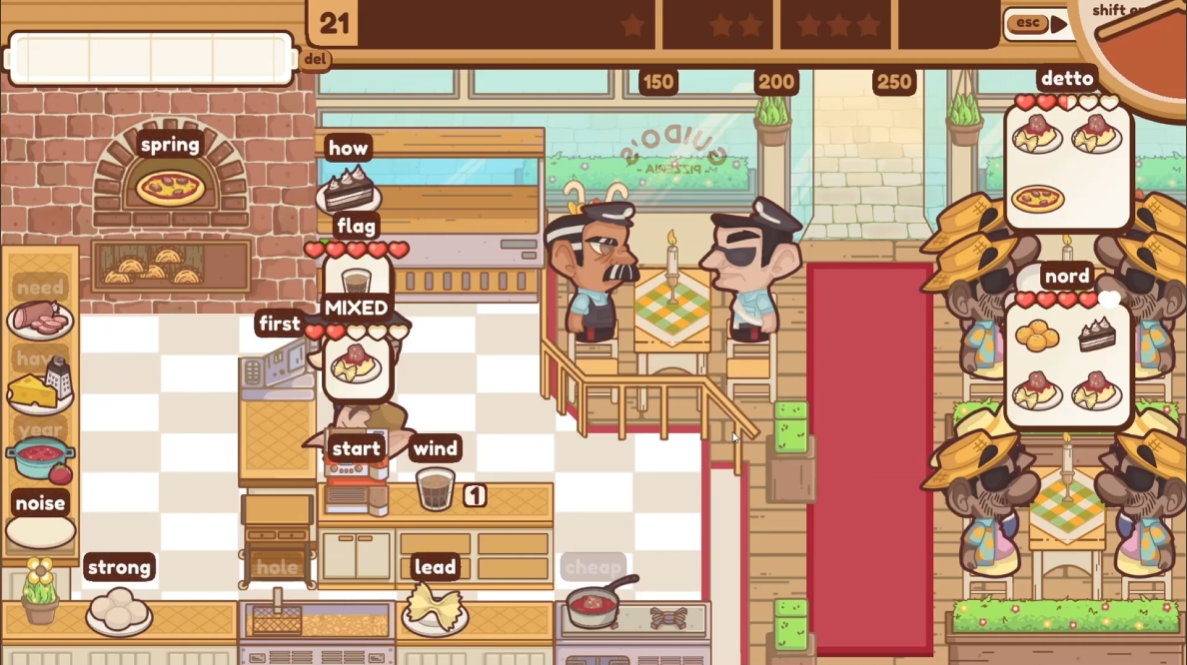
- Prompt displayed as white text on a brown box
- Positioned against detailed brickwork from the oven
- Competing with multiple other words and UI elements on screen
- Appears during high-pressure multitasking gameplay
This is where cognitive load in games QA becomes critical. The player is not reading in isolation. They are typing, tracking orders, moving, and reacting at speed.
As a dyslexic player, white text against a busy patterned background is significantly harder to process. During gameplay, this prompt was repeatedly missed. It only became clearly visible when reviewing recorded footage.
What this actually means in gameplay
The system is not broken. The interaction exists. But the player fails to perceive it in time. That delays progression, creates confusion, and impacts performance under pressure.
This is not a functional bug. It is a UI prompt visibility issue under pressure.
It shows how accessibility issues in games QA are not always about missing features. They are often about whether players can process information quickly enough to act on it.
Subtitle occlusion issues in VR games: Shadow Point
In VR accessibility testing, accessibility issues often appear when systems overlap. My Shadow Point project produced several clear examples.
Subtitles worked in isolation.
They failed when combined with other systems.
The examples below show three different ways feedback became unreliable: UI overlap, object occlusion, and missing non-audio confirmation.
UI blocking subtitles: SP-12
In SP-12, a backpack item popup appeared after picking up a book at the same time subtitle text appeared in the lower screen area. The popup covered the subtitles for around two seconds.
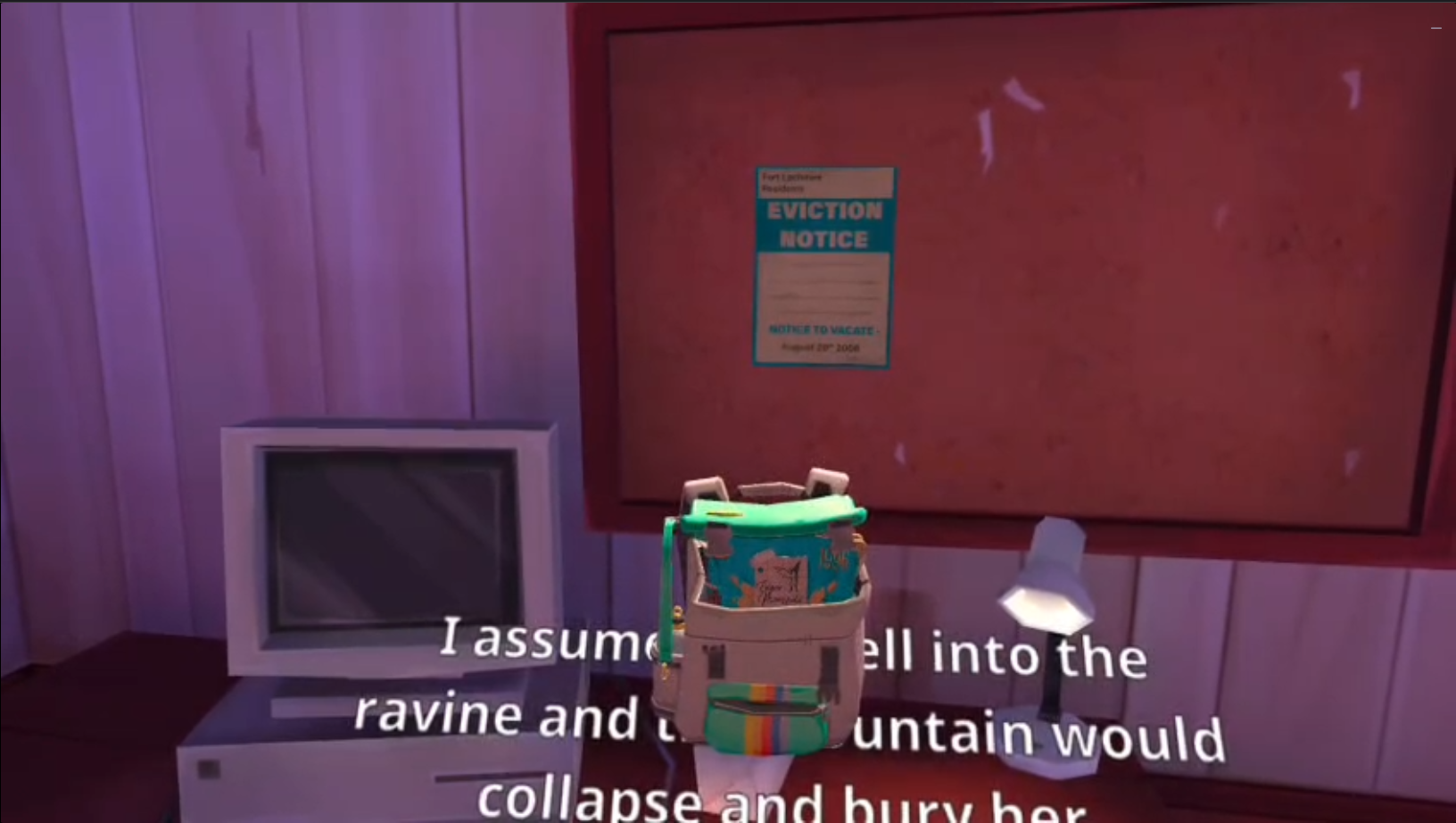
The result was simple: dialogue was missed.
Held object blocking subtitles: SP-24
In SP-24, the player could hold a book in front of them while subtitles appeared behind it. The subtitle panel became unreadable until the object was moved aside.
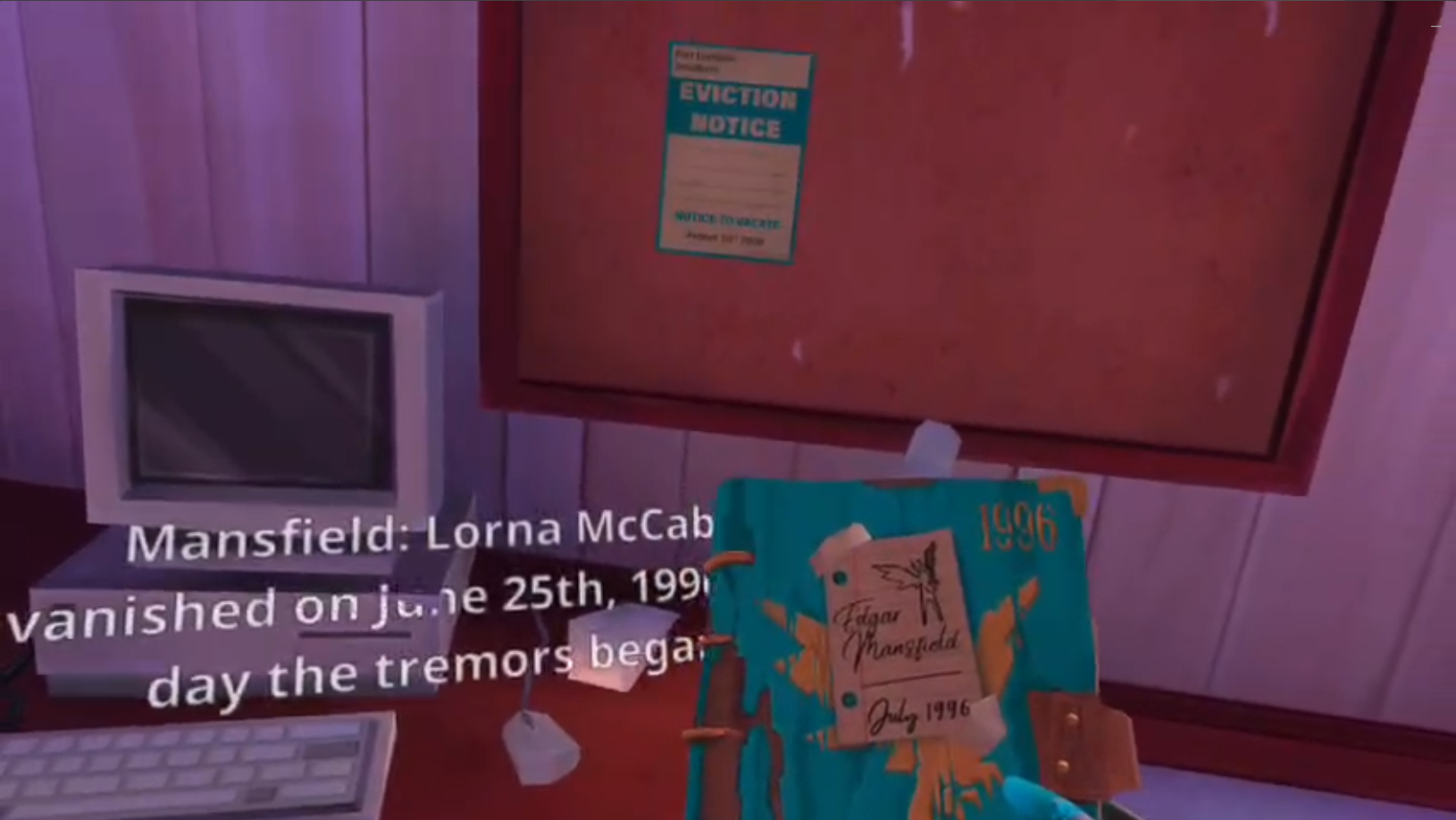
This is a clear subtitle occlusion issue in VR games. The subtitle system exists, but the player cannot rely on it.
Missing non-audio feedback: SP-27
In SP-27, tutorial steps relied on audio confirmation. With Music, Game, and Voice audio set to 0, there was no clear visual or haptic confirmation for key steps.
This matters because the player still needs confirmation when audio is unavailable.
What this actually means in gameplay
If feedback is not accessible through multiple channels, the player loses the ability to confirm actions. This breaks the player-game interaction loop, even when the underlying system is working correctly.
What Shadow Point shows
Subtitles, UI overlays, held objects, audio feedback, and player position all interact. When those systems overlap poorly, the player loses access to information.
These are accessibility bugs in games because they block comprehension, not because a feature is missing. This is where accessibility design patterns QA becomes essential in identifying interaction failures between systems.
Game HUD readability issues under pressure: Rebel Racing
In Rebel Racing, the HUD was technically functional.
But during active racing, several UI elements created readability strain:
- Small POS label with no visual container
- Small white timer that was hard to read
- Rival name top centre in unboxed white text
- Objective in the top left displayed in small, unboxed white text
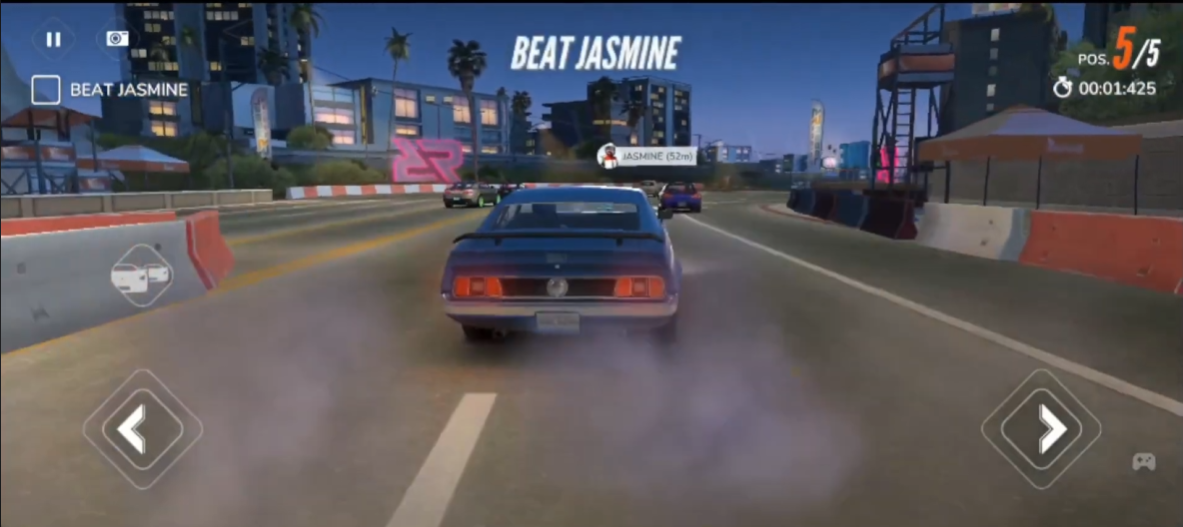
The screenshot above makes these elements look more readable than they are in reality. On a mobile device, the HUD is significantly smaller, and these elements compete with motion, speed, and player focus.
As a dyslexic player, low-contrast white text is especially difficult to process. During testing, I did not register some of these UI elements at all during gameplay. They only became visible when reviewing recorded footage.
What this actually means in gameplay
If a player cannot perceive critical HUD information during active play, the system is not effectively communicating. This directly affects decision-making, reaction time, and performance.
This creates game HUD readability issues under pressure.
What Rebel Racing shows
A HUD can technically display information and still fail if the player cannot process it quickly enough during gameplay.
This is especially relevant for mobile game QA testing, where screen size, motion, timing pressure, and touch interaction all compete for attention.
Game QA accessibility bug examples
Across these projects, the pattern is clear. The system may work, but the player interaction still breaks.
| Project | Accessibility issue | Player impact |
|---|---|---|
| The Chef’s Shift | Oven prompt difficult to see against a busy background under pressure | Player misses the step, delays service, and loses flow |
| Shadow Point: subtitles | Subtitles occluded by UI popups and held objects | Dialogue and tutorial information become unreadable |
| Shadow Point: feedback | Tutorial confirmation relies on audio without visual or haptic fallback | Player cannot confirm progress when audio is off |
| Rebel Racing | Small, low-emphasis HUD text during active racing | Player has to process key information under speed and pressure |
These are practical game QA accessibility bug examples, not abstract theory. They show how accessibility issues in games QA affect actual gameplay systems.
How to test accessibility in games without turning it into theory
If you want to know how to test accessibility in games, a checklist can help, but it should not be the starting point.
Start with the player-game loop.
- Can the player see the required information?
- Can the player understand what the game is asking?
- Can the player act without unnecessary strain?
- Does the game provide feedback through more than one channel?
- What happens when UI, gameplay, audio, and player movement overlap?
These are practical game QA testing techniques because they focus on player access, not just feature existence.
Testing accessibility in games
The goal is not to prove the game has accessibility features. The goal is to find where players lose access to interaction, feedback, or understanding.
How to test accessibility without disabilities
A common question in accessibility testing in games is how QA can approach it without lived experience.
The goal is not to simulate that experience. Instead, QA focuses on identifying structural barriers that affect player interaction.
- Is critical information readable?
- Is feedback available visually, audibly, and where useful, haptically?
- Does timing pressure make UI recognition unfairly difficult?
- Does the game rely on one sensory channel only?
- Does the player have enough clarity to understand what changed?
This is valid accessibility testing in game development. It does not replace disabled player feedback, but it helps QA identify barriers earlier.
Game accessibility testing takeaways for QA
- Game accessibility testing in QA is about interaction access, not making games easier.
- A system can work technically and still create an accessibility issue if the player cannot perceive or use it reliably.
- UI readability issues in games become more serious under pressure, speed, or multitasking.
- VR accessibility testing needs to consider player viewpoint, object placement, subtitles, overlays, and feedback redundancy.
- Good player experience testing in games separates intended challenge from unnecessary access barriers.
- Accessibility findings are strongest when they describe the player impact, not just the feature behaviour.
FAQ: Game accessibility testing in QA
What is game accessibility testing in QA?
Game accessibility testing in QA evaluates whether players can reliably interact with gameplay systems, not just whether those systems technically function.
Are accessibility bugs always functional bugs?
No. Some accessibility bugs in games happen when the system works, but the player cannot perceive, process, or act on the information reliably. That makes it a player access issue, not always a broken-function issue.
How do accessibility issues affect gameplay systems?
They affect gameplay systems by blocking interaction, increasing cognitive load, hiding critical feedback, or making the player unsure whether progress has occurred.
What are examples of game accessibility testing issues?
Examples include unreadable HUD text, prompts that are easy to miss under pressure, subtitles blocked by UI or objects, missing non-audio feedback, and interaction cues that do not match what the player can actually do.
How do you test accessibility without disabilities?
You test for structural barriers: unclear feedback, poor readability, input strain, timing pressure, missing redundancy, and situations where the player cannot reliably access the interaction loop. This does not replace disabled player feedback, but it does help QA identify issues earlier.
Is accessibility the same as difficulty?
No. Difficulty is about challenge after the player can access the system. Accessibility is about whether the player can perceive, understand, and interact with the system in the first place.
Game accessibility testing evidence and case study links
- The Chef’s Shift game QA testing case study
- Shadow Point VR accessibility and comfort testing case study
- Rebel Racing exploratory and edge-case testing case study
- Game QA testing articles hub
This page focuses on game accessibility testing in QA and how accessibility failures block player interaction. The linked case studies provide the wider project scope, workbook notes, bug summaries, Jira-style tickets, and evidence clips.
Contact me about game QA testing Connect on LinkedIn Browse more game QA testing articles