Back to Articles Hub Game QA Portfolio
Game QA Workflow: From Test Session to Jira Bug Report
A practical game QA testing workflow for capturing evidence and writing clear Jira bug reports.
This article explains my game QA workflow, from recording gameplay sessions to creating structured Jira bug reports. It covers how I capture gameplay evidence, organise test documentation in Google Sheets, and maintain clear traceability across functional, exploratory, and regression testing in games.
It is designed for aspiring video game testers and QA professionals who want to understand how game QA testing works in practice, using real portfolio examples and developer-ready reporting.
TL;DR
- Game QA workflow: Test → Capture → Clip → Label → Store → Report.
- Tools used: OBS Studio, Microsoft Clipchamp, Google Sheets, Jira, YouTube (unlisted), and external SSD backup.
- Main point: effective game QA testing is not just finding bugs, but making them easy to reproduce, understand, and fix.
- Traceability: gameplay evidence, documentation, and Jira bug reports are linked into a single QA pipeline.
- Examples shown: functional, exploratory, and regression game testing workflows from real portfolio projects.
What this article is for
This page shows how I work in practice as an aspiring video game tester, using a structured game QA workflow to move from raw gameplay to clear, reproducible bug reports.
Instead of only showing finished outputs, this article breaks down the full game QA testing process: how gameplay sessions are recorded, how evidence is trimmed into usable clips, how game testing documentation is organised, and how issues are reported clearly in Jira bug reports with supporting evidence.
Why Game QA Testing Evidence Matters
Finding a bug during game QA testing isn’t enough.
If a developer can’t see it, reproduce it, and understand it quickly, the issue slows the team down instead of helping it. This is why clear bug reporting in games is a core part of the video game testing process.
That’s why I focus on structured game QA workflow practices — turning raw gameplay into clear, reproducible, developer-ready Jira bug reports supported by focused evidence.
Game QA Workflow: End-to-End Testing Process
Every issue I log follows the same game QA workflow, designed to turn raw gameplay into clear, reproducible bug reports.
Core workflow
Test → Capture → Clip → Label → Store → Report
This structured QA testing process ensures nothing is missed, and every game bug is supported by clear, usable evidence.
1. Test (Structured or Exploratory Game QA Testing)
I begin each session using one of two game QA testing methods:
- Structured game testing (test matrix, defined scenarios)
- Exploratory game testing (charter-based sessions)
Each session is scoped and time-boxed to keep the video game testing process focused, efficient, and intentional.
2. Capture (Recording Gameplay Bugs & QA Evidence)
All game QA testing sessions are recorded using OBS Studio.
This ensures that gameplay bugs are captured in real time as part of a structured game QA workflow, without relying on memory or incomplete notes.
Recording full sessions allows me to:
- Capture issues in real time
- Retain full gameplay context
- Support accurate bug reporting with video evidence
When a bug occurs, the QA testing evidence already exists and can be extracted immediately.
3. Clip Extraction (Creating Gameplay Bug Evidence for QA)
Raw recordings are not useful on their own in a game QA workflow.
Developers don’t want to watch several minutes of gameplay footage to find a bug. Effective bug reporting in games relies on short, focused clips that clearly show the issue.
I use Microsoft Clipchamp to extract gameplay bug evidence — short clips that isolate:
- The trigger
- The failure
- The result
Example: Gameplay Evidence Refinement
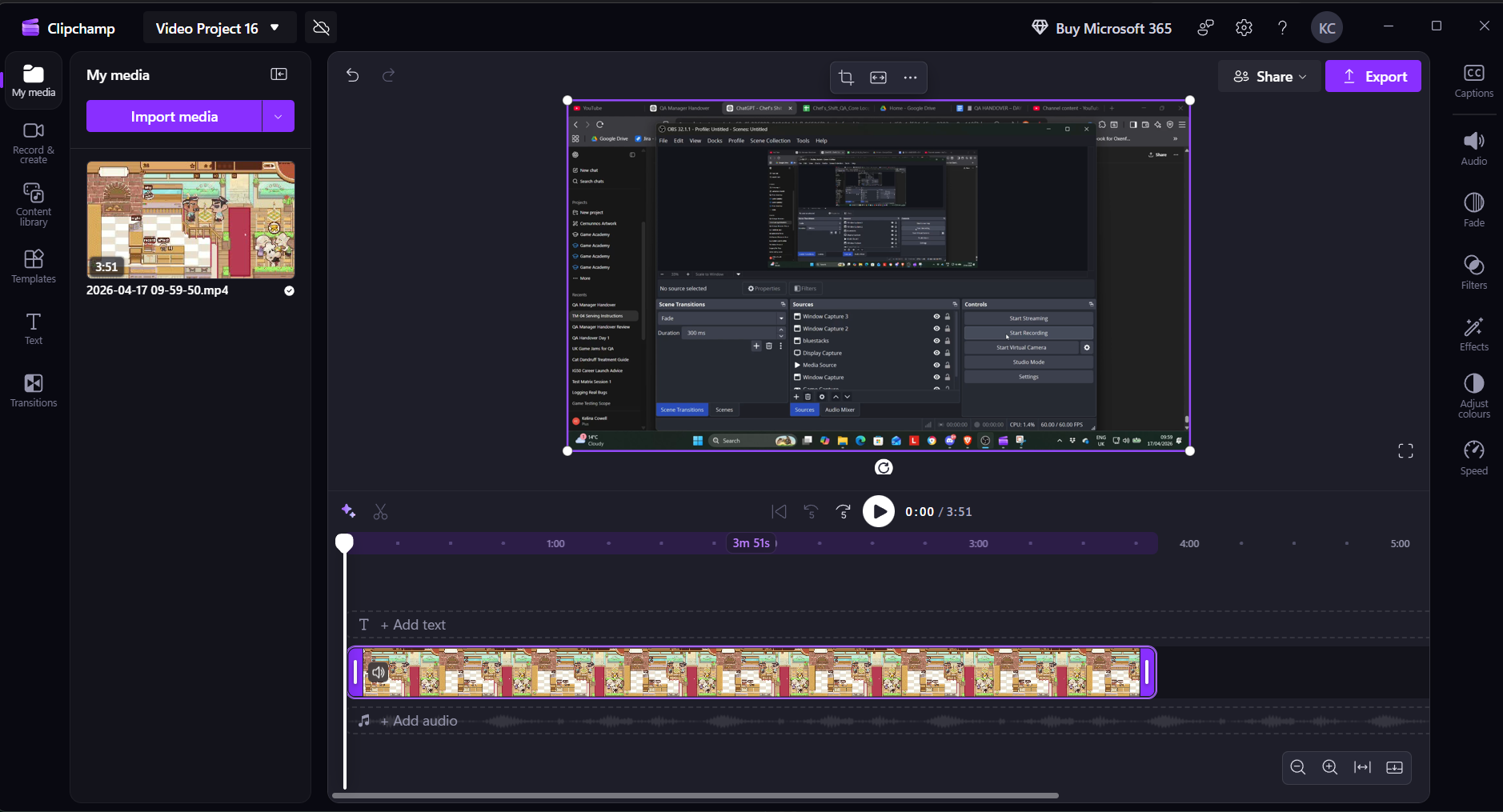
Full gameplay recording used during game QA testing to preserve context before extracting bug evidence.
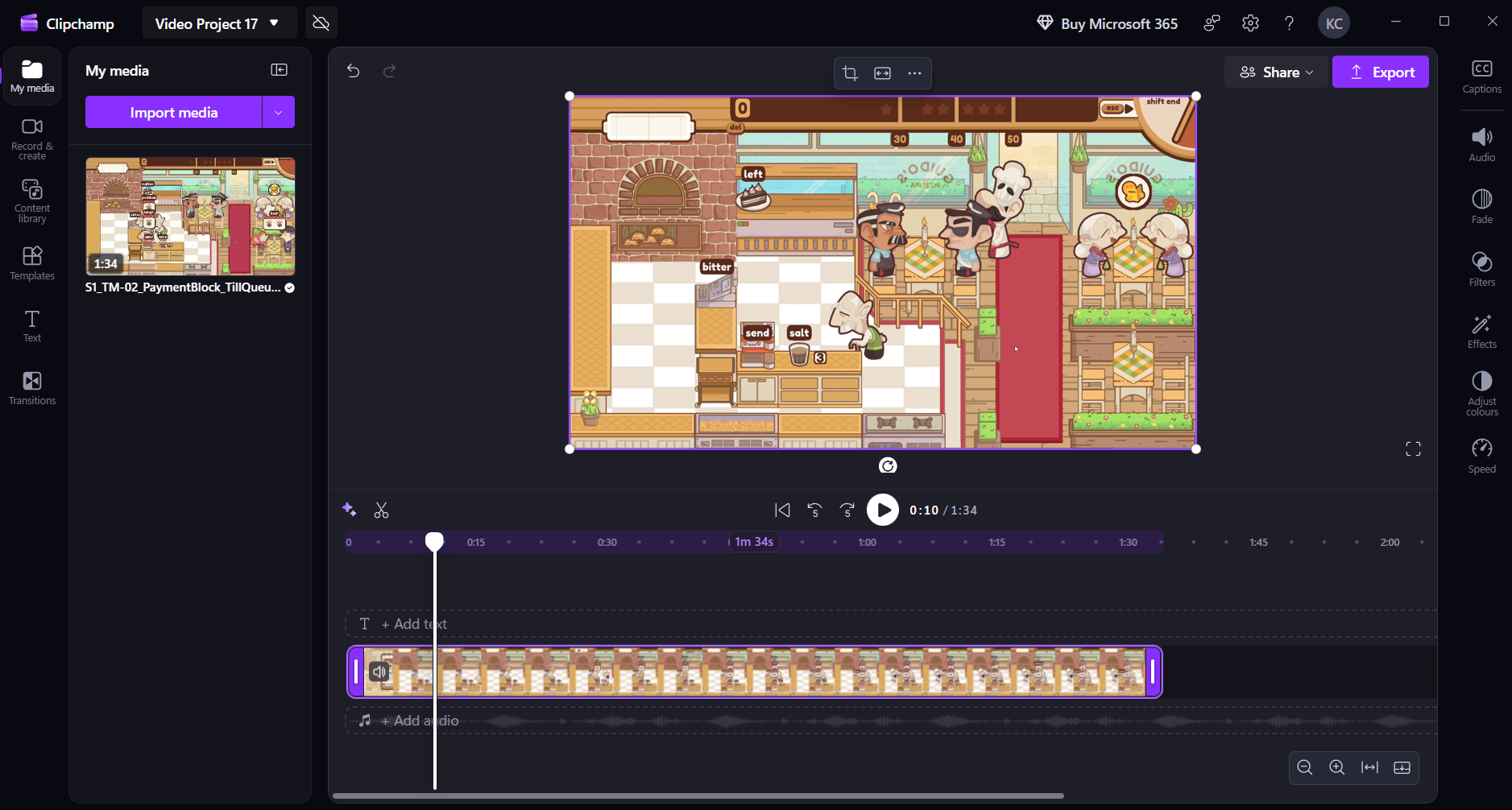
Focused gameplay clip used for Jira bug reports, showing the issue clearly for developers.
Before → After
Full gameplay session reduced to a short, reproducible gameplay bug evidence clip. This improves game QA testing by ensuring developers see the issue instantly, without wasting time searching through raw footage during bug reporting.
4. Naming & Labelling QA Evidence (Traceability in Game QA Workflow)
All gameplay clips follow a consistent QA evidence naming convention as part of my game QA workflow.
[PROJECT]_[BUG-ID]_[DESCRIPTION]
Example:
CHEF-1_PaymentFails_MultiCustomer_Run3.mp4
This structured approach improves traceability in game QA testing and supports clear bug reporting by making each piece of evidence easy to identify and link.
It allows:
- Instant identification of gameplay bug evidence
- Direct mapping to Jira bug reports
- Clean organisation across game QA projects
5. Game QA Storage & Documentation Workflow
I organise game QA testing data across local storage, cloud access, and structured game QA documentation to maintain a clear and reliable workflow.
Raw Sessions (Local)
- Full gameplay recordings stored locally during game QA testing
- Used to revisit context and validate gameplay bug evidence when needed
Edited Clips (YouTube – Unlisted)
- Uploaded to a dedicated gameplay bug evidence channel
- Organised by project for easy access
- Linked directly in Jira bug reports
Why YouTube:
- Avoids local storage overload
- Fast sharing via link for bug reporting
- Easy access for developers and reviewers
- Simulates controlled sharing (similar to NDA workflows in game QA)
Documentation (Google Sheets)
Each project uses a single Google Sheets workbook as the central game QA documentation hub, linking testing sessions, notes, and evidence into one system.
Core tabs:
- README — scope, environment, constraints
- STAR Summary (Bugs) — key findings
Additional tabs vary by project:
- Charter Matrix
- Session Log
- Bug Log
- Device Matrix
- Daily Smoke
Example: Game QA Workbook Structure
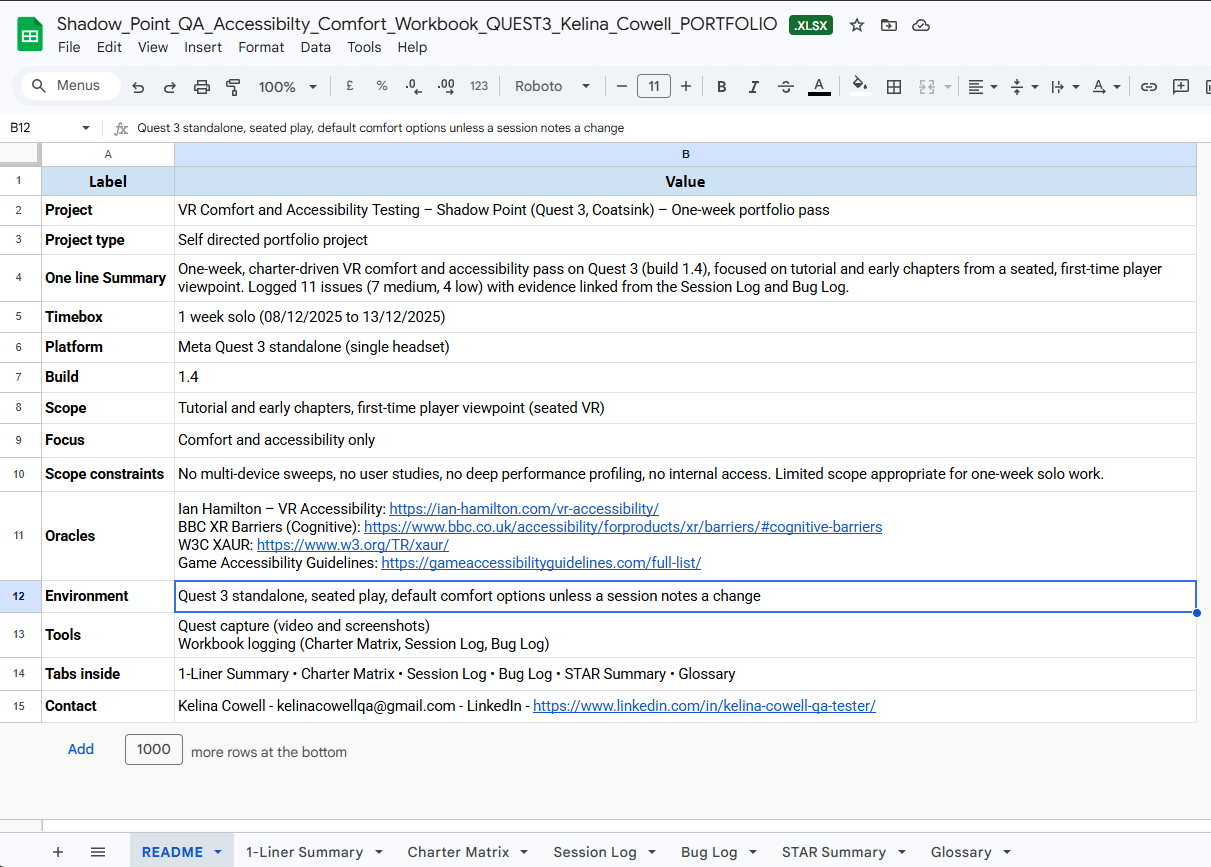
Central game QA documentation page defining scope, environment, tools, and testing constraints.

All game QA workflow activity is organised in one workbook, allowing full traceability from testing to reporting.
6. QA Traceability (Connecting the Game QA Workflow)
All game QA testing evidence is linked directly inside the workbook to maintain full QA traceability across the entire workflow.
- Bug IDs → gameplay video evidence
- Test sessions → notes and outcomes
- Findings → summarised in STAR format
This creates a clear game QA workflow chain from testing to bug reporting, ensuring every issue can be traced back to its original context.
Traceability chain
Test → Observation → Evidence → Report
7. Jira Bug Reporting (Game QA Bug Report Example)
I document all issues in Jira using a structured format designed for clear game QA bug reporting and fast developer understanding.
This approach reflects a real QA testing workflow, where each bug report provides enough detail to reproduce, verify, and fix the issue efficiently.
Each Jira bug report includes:
- Title
- System / Area
- Environment
- Build
- Reproduction Steps
- Expected Result
- Actual Result
- Severity / Priority
- Repro Rate
- Evidence (linked video/screenshots)
Example: Jira Bug Report for Game QA
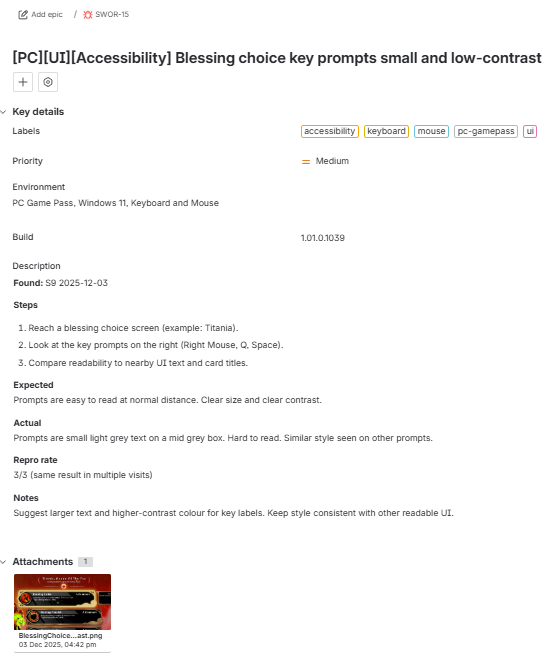
Structured game QA bug report with reproduction steps, expected vs actual behaviour, severity, and linked gameplay evidence.
All Jira bug reports are directly linked to gameplay evidence clips and tracked within my game QA documentation workflow, ensuring full traceability from test session to final report.
8. Game QA Workflow Pipeline: Sheets ↔ Jira Integration
My game QA workflow connects documentation and reporting into a single system, rather than treating them as separate tools.
This integrated QA testing process ensures that gameplay evidence, notes, and Jira bug reports remain consistent and traceable.
How it connects
Google Sheets (QA Tracking & Context)
- Game test runs and session logs
- Bug discovery and observations
- Gameplay evidence links
- Internal bug ID tracking
Jira (Game QA Bug Reporting)
- Structured Jira bug reports
- Developer-facing documentation
- Severity and priority assignment
Field Alignment (Example)
| Google Sheets | Jira |
|---|---|
| Bug ID | Issue Key |
| Notes / Observation | Description |
| Test Steps / Actions | Reproduction Steps |
| Expected / Actual (logged) | Expected vs Actual |
| Severity / Priority | Severity / Priority |
| Evidence Link (YouTube) | Attachments / Links |
This game QA workflow pipeline ensures:
- No duplication of effort
- Consistent data across QA tools
- Clear traceability from game QA testing → evidence → bug reporting
Game QA Testing Types: Functional, Exploratory, and Regression
The game QA testing approach changes depending on the goal of the session and the stage of development.
Functional Testing (Battletoads)

Structured game QA testing validating expected behaviour with clear traceability to bug reports and evidence.
Exploratory Testing (Rebel Racing)

Charter-based game QA testing capturing real-time actions, observations, and gameplay behaviour.
Regression Testing (Sworn)

Game QA regression testing validating fixes, tracking known issues, and ensuring stability across builds.
Backup Strategy for Game QA Data (Critical)
All game QA testing data is backed up to an external SSD as part of a reliable game QA workflow, ensuring that gameplay evidence and documentation are never lost.
- Raw gameplay recordings
- Supporting QA evidence files
- Game QA documentation and notes
This backup strategy protects gameplay bug evidence and ensures continuity in bug reporting and QA testing.
Why This Game QA Workflow Works
This game QA workflow is designed to reflect real game QA testing practices used in production environments.
It:
- Mirrors real game QA processes
- Produces clear, reproducible gameplay bugs
- Supports efficient bug reporting for developers
- Demonstrates structured QA thinking
Most importantly:
It shows not just that I can find issues during game QA testing, but that I can communicate them clearly through structured Jira bug reports in a real game production environment.
Final Thought on Game QA Testing
Good game QA testing isn’t about finding the most bugs.
It’s about making sure the right issues are clearly communicated and fixed quickly through effective bug reporting.
And that ultimately comes down to how well you capture, structure, and present gameplay evidence within a consistent game QA workflow.
Game QA Testing and Bug Reporting FAQ
Do game QA testers need to record full gameplay sessions?
Not always, but recording full sessions is one of the most reliable game QA testing practices. It ensures gameplay bugs can be revisited, verified, and turned into clear bug reporting evidence without relying on memory.
Why not upload raw gameplay instead of trimming clips?
Raw footage slows down bug reporting in games. Developers need to see the issue immediately. A focused clip shows the trigger, failure, and result without forcing someone to scrub through long recordings.
Is storing QA evidence in multiple places overkill?
No. Local recordings, cloud-hosted clips, and structured game QA documentation serve different purposes. Together, they protect data, allow fast access to gameplay bug evidence, and maintain a clear audit trail within a game QA workflow.
Why use both Google Sheets and Jira in game QA?
They solve different problems. Google Sheets supports QA testing workflow tracking, while Jira bug reporting is used for developer-facing issues. Linking them creates a single, traceable pipeline instead of disconnected tools.
What makes a good game QA bug report?
A strong game QA bug report is clear and reproducible. It shows what happened, how to trigger it, what was expected, what actually occurred, and includes gameplay evidence that confirms the issue.
Do all game QA bugs need video evidence?
Not always, but for gameplay, input, and UI issues, video is extremely valuable. It shows timing, context, and player interaction in a way text alone cannot, improving bug reporting accuracy.
Is this game QA workflow realistic in a studio environment?
The exact tools may vary, but the structure is standard. Most studios expect a game QA workflow that captures evidence, documents clearly, and maintains traceability between testing and reporting.
Why is traceability important in game QA testing?
QA traceability ensures every bug can be tracked back to its origin, evidence, and testing context. This makes verification, regression testing, and communication much more efficient.
Related Game QA Testing Projects and Articles
- Battletoads – Functional Game QA Testing Case Study
- Rebel Racing – Exploratory Game QA Testing Case Study
- Sworn – Regression Testing Game QA Case Study
- Shadow Point – VR Game QA Testing & Accessibility Case Study
- The Chef’s Shift – Early Build Game QA Testing Case Study
- Game QA Testing Articles and Guides
This article focuses on game QA workflow and evidence structure. The linked game QA testing case studies provide real examples of bug reporting, documentation, and testing approaches across different types of games and platforms.